How Featurevote stops duplicate requests before posting
Before a visitor posts, Featurevote shows up to three similar requests, so they can vote for one instead of posting a duplicate.
When someone submits a new request on your Feedback Portal, Featurevote checks whether a similar request already exists — and if so, nudges them to vote for it instead of creating a duplicate. This keeps demand consolidated and your board clean, without you having to merge duplicates after the fact.
This happens on your Feedback Portal and embed automatically. It's separate from the admin merge duplicates tool, which you use on requests that are already on the board.
What the Submitter Sees
A visitor writes their request and clicks Share idea, or Continue if the board doesn't know them yet (their email comes on the next step). Before the request is created, Featurevote briefly checks for similar existing requests (the button shows "Checking for similar requests…").
If it finds close matches, instead of submitting, it shows a panel:
Looks like this might already exist Voting for an existing request is the fastest way to boost it.
The panel lists up to three existing requests, each with its title, its current vote count, and a short explanation of why it looks similar.
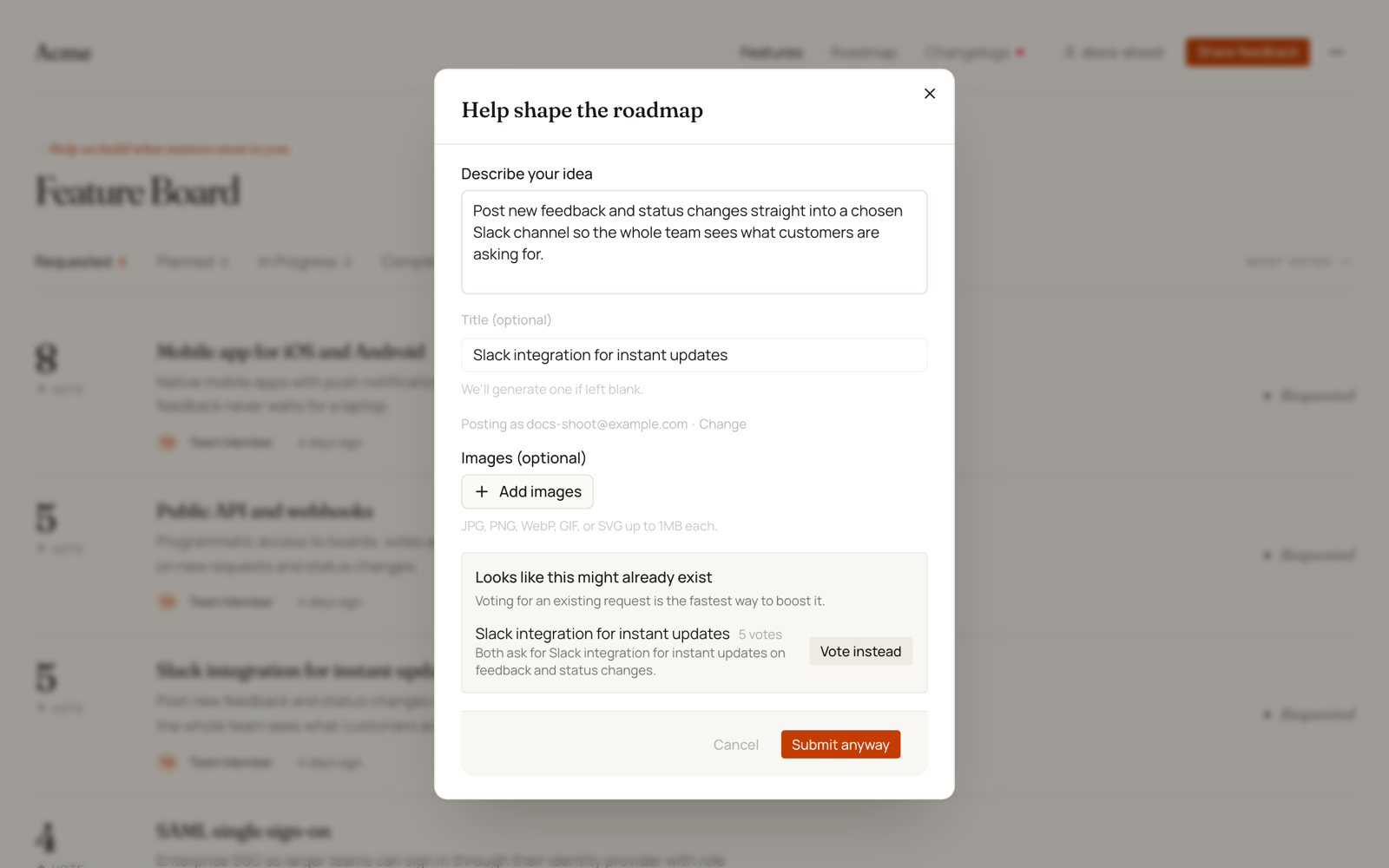
What They Can Do
From the panel, the submitter can:
- Vote instead — vote for an existing request right there. (On boards with Visitor email set to To vote, post and comment, they're asked for an email first.) The dialog then closes.
- Submit anyway or Continue anyway — go ahead with their new request as written. Someone the board already knows sees Submit anyway. A new visitor sees Continue anyway and gives their email on the next step.
- Edit their draft — changing the title or description hides the panel; the check runs again the next time they post.
Bug Reports
On a board with Known issues on, a bug report is compared only with other bugs, and an idea only with other ideas. For a bug the panel asks Already known?, and each match offers Me too instead of Vote instead.
How Matching Works
Detection is AI-based, in two stages:
- A fast semantic pass compares the draft against your board's existing requests to find likely candidates.
- Those candidates are scored for how closely they match.
Only genuinely close matches are shown (roughly "very likely the same request" and up), capped at three and ordered by strength. Loosely related ideas aren't surfaced, so submitters aren't nagged over every vaguely similar request.
The check is advisory only — it never blocks submission. If the check can't run for any reason, the request submits normally with no interruption.
Similar-request detection reduces duplicates at the source. For the ones that still slip through, use Finding and Merging Duplicates.